
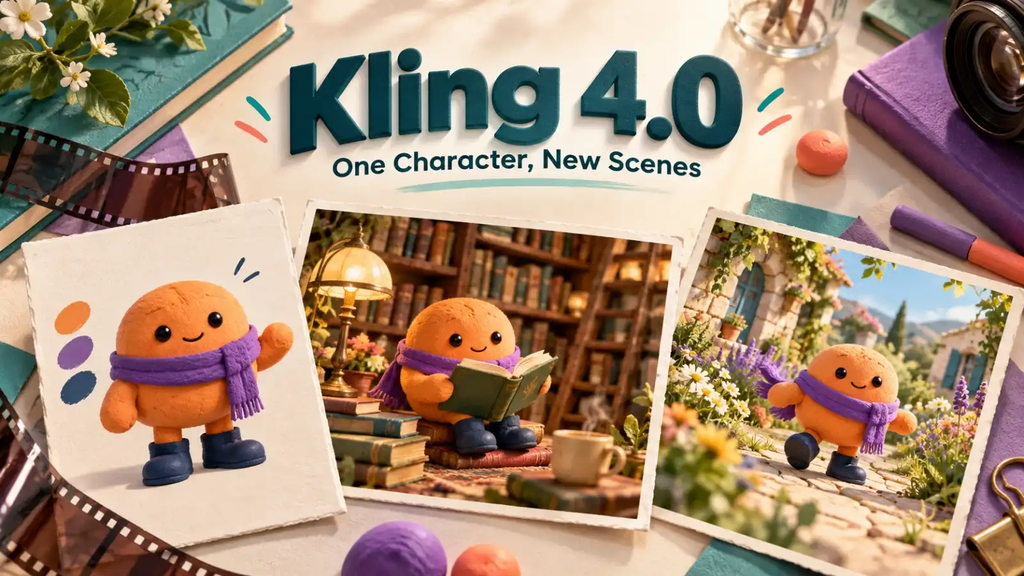
A creator draws a small orange character with a purple scarf and navy boots. In one short video, it explores a library. In the next, it walks through a garden. The setting changes, but the audience should still recognise the same little character. If its shape, colours and clothes change too much, the second clip can feel like the start of an unrelated story.
Kling 4.0 on JXP offers a Reference to Video mode that accepts images and videos to guide a scene. For a recurring animated character, a clear design image gives the generator something more specific than a fresh written description each time. It is guidance rather than a guarantee, but it provides a useful place to start when making several clips around one original character.
Decide what makes the character recognisable
You do not need a complicated design to make a memorable character. The orange creature has a round body, a purple scarf and dark boots. Those few details are easy to notice. They also give the creator a simple way to judge whether another version still looks like the same character.
Start with the details you would miss if they changed. That might be a distinctive body shape, a colour combination or one important accessory. A tiny badge or an intricate pattern may be attractive in a still picture but difficult to notice in a short moving clip. Choose the features that remain clear when the character is small on a screen.
Keep the design original. Describing an existing film or game character may seem like a shortcut, but it makes the project dependent on someone else’s identity. A simple character of your own is easier to develop into a recurring presence for personal stories, creative posts or a small brand.
Use a reference that shows the whole design
A reference picture should make the important details easy to see. For the orange creature, a clear full-body image would show the scarf, boots and overall shape together. If the feet are cropped out or a prop hides most of the body, the picture explains less about the character.
A simple background helps separate the design from the setting. A picture of the character in a busy room may leave you unsure which details belong to the character and which are only scenery. The reference does not have to be a formal model sheet. It just needs to communicate the appearance you want to carry into the video.
Use an image you are allowed to submit and check the current file requirements in the workspace. Start with one strong picture rather than several conflicting versions. If one image has a long scarf and another has a short one, the generator is being asked to interpret a disagreement before it has even begun the scene.
Change the scene without redesigning the character
Once the design is clear, the scene prompt can focus on what happens. A first example might be: Use the attached character image as the visual reference. The small orange character carries a closed book through a cosy library. Keep its round shape, purple scarf and navy boots recognisable. Gentle clay-animation style, with no other characters.
For the garden clip, the action could change to carrying a small watering can along a path. The new setting and prop give the character something different to do. There is no need to describe a different body shape, costume or artistic style unless that change is intentional.
These are example directions, not results tested for this article. They explain the intended relationship between a reusable design and a new scene. A short first attempt is enough to see whether the character and action suit the idea before making an entire series.
The reference also does not mean that every frame should look like the same still image. The character needs to turn, walk and react. The aim is to preserve its identity while letting its pose and expression change naturally.
Compare the details that viewers will notice
When working on Kling 4.0 character consistency, compare the new clip with the source design and any earlier clip you intend to use. Does the scarf still have the same colour? Are the boots recognisable? Has the round body become tall and narrow? Those questions are more useful than asking whether the new scene looks impressive in isolation.
Watch the complete action, especially when the character turns or passes behind an object. A character that looks right at the beginning may change later. On the other hand, different lighting can make the same colour look warmer or cooler without creating a different character. Judge the overall design, not a single pixel.
If a feature changes too much, return to the reference and the scene description. Make the important trait clearer, remove a conflicting instruction or simplify an action that hides it. Changing every part of the request at once makes it harder to understand what helped. Check the displayed credit estimate before generating more variations.
Give the character a reason to come back
A recurring character is useful when it does more than stand in a new background. It might introduce a different topic each week, act out a small everyday problem or lead viewers into a short illustrated story. The audience recognises the character, while the action gives them something new to watch.
For the orange creature, the library could introduce a reading post and the garden could accompany a seasonal update. The scenes do not need to form one continuous film. If you want to join them, review the transition in an editor rather than assuming separate generations will connect automatically.
Kling 4.0’s reference options give the creator a way to communicate a design visually instead of rebuilding it from words alone. Begin with a character that is easy to recognise, give it one clear action and keep the reference nearby when reviewing the result. The setting can change. The audience should still know who has arrived.
Read more: https://punzteam.com/the-retirement-routine-that-makes-days-feel-more-meaningful/
https://punzteam.com/how-to-tell-a-goal-still-fits/
https://punzteam.com/the-funny-side-of-modern-life-from-shopping-habits-to-workplace-technology/