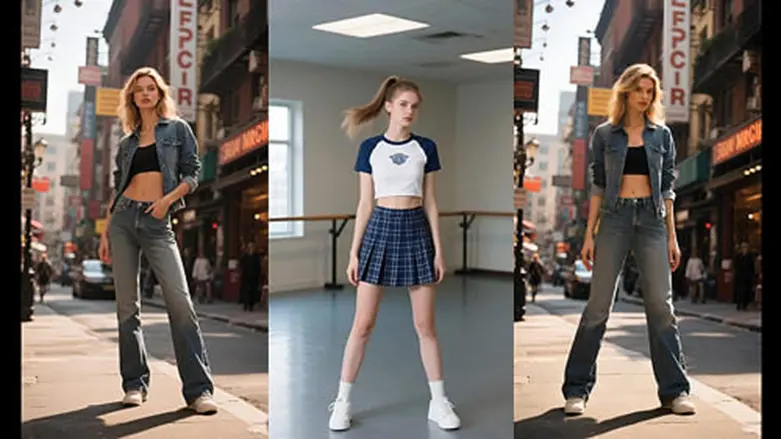

Creating a memorable video does not always begin with a camera. Sometimes, a single photograph can provide enough inspiration for an entire creative project. A landscape, portrait, product picture, or illustrated character can become the foundation for an animated presentation. Artificial intelligence has made this process more accessible by offering tools that generate movement and transform ordinary images into engaging video content.
For people who enjoy experimenting with digital media, image animation and automated dance creation offer two interesting approaches. They can help social media creators, bloggers, marketers, and beginners explore video production without learning complicated animation techniques.
Start With a Picture That Tells a Story
A successful animated video begins with choosing the right source image. The photograph should contain a clear subject and enough visual information for the software to interpret its surroundings.
An image to video AI application can analyze an uploaded picture and generate a sequence of frames that introduces movement. Depending on the available features, users may describe an action, request camera movement, or select a predefined animation effect.
For example, a photograph of a person standing beside a window could become a short scene showing gentle movement, changing lighting, or a gradual camera approach. A product photograph might be turned into a promotional clip with subtle visual motion.
The technology is particularly useful when a creator wants to reuse existing pictures rather than organize another photoshoot.
Creative advantages of image animation
- Fresh presentation: Give older photographs a different appearance by introducing suitable motion effects.
- Flexible production: Develop short clips from personal pictures, illustrations, and product photography.
- Less technical work: Explore animation without manually editing individual video frames.
- Content variety: Prepare different versions of a visual for websites, presentations, and social media.
- Storytelling opportunities: Turn a simple image into a scene that communicates an idea through movement.
The best results generally come from using clear photographs and describing one main movement at a time. Complicated instructions can sometimes produce unexpected changes in the generated scene.
Create Dance Content Without Recording Every Movement
Dance videos require more than an attractive photograph. They need coordinated body movements, suitable timing, and a visual presentation that makes the performance enjoyable to watch.
An AI dance generator free application can help users experiment with these elements by animating supported photographs or digital characters. Depending on the platform, users can upload an image, select a dance template, and generate a clip featuring the chosen choreography.
This can be an interesting option for people creating entertaining content for social media. Instead of recording a performance themselves, they can explore how a character or photograph looks with different animation styles.
Where AI dance creation can be useful
Entertainment pages: Create humorous or playful videos featuring animated characters.
Social media campaigns: Prepare short promotional clips that combine familiar images with movement.
Digital storytelling: Introduce dancing characters into fictional scenes and creative presentations.
Personal projects: Experiment with different choreography styles using suitable photographs.
Content experimentation: Compare multiple animation ideas before selecting a final video.
A full-body photograph is usually a better starting point because the software needs to interpret the subject’s overall position. Images with hidden limbs, cropped legs, or unusual poses can produce less convincing results.
Make Your Video More Interesting With Better Creative Direction
Choosing an animation effect is only one part of producing a good clip. The instructions supplied to the application can also influence how the final result looks.
For image animation, describe the subject’s movement, background activity, and camera direction clearly. Rather than requesting several unrelated actions, begin with a simple instruction and refine it after reviewing the first result.
For dance projects, select movement patterns that suit the original photograph. A character facing the camera with a visible body position generally offers a more suitable starting point than an image with an obstructed view.
Music and editing can also influence the final presentation. Adding suitable background audio, trimming unnecessary sections, and choosing an appropriate video format can make a generated clip easier to share.
Finding Useful Features in Free AI Video Platforms
Many online applications allow users to experiment with video creation before purchasing a subscription. A free image animation or dance generation feature can be useful for understanding how a particular platform works.
However, free access does not always include every available option. Some services restrict the number of generations, limit video duration, add watermarks, or reserve higher-quality exports for paid accounts.
Before choosing a platform, consider these points:
- Check the number of free video generations available.
- Review supported image formats and maximum upload dimensions.
- Compare downloadable video quality and watermark restrictions.
- Examine privacy policies before uploading personal photographs.
- Confirm commercial usage permissions before using generated material in advertisements.
These details can help prevent unexpected restrictions when working on a larger project.
Responsible Use Makes Better Digital Content
Realistic animation introduces additional responsibilities. When using photographs of identifiable people, obtain the appropriate permission before creating or sharing altered videos. Avoid producing misleading material that suggests someone performed an action without their consent.
Also remember that generated videos may contain distorted facial features, inconsistent backgrounds, or unnatural body movements. Watching the entire clip before publishing is important, especially when the content represents a business or public-facing brand.
Final Thoughts: Give Your Images a New Creative Direction
Still photographs can offer much more than a single visual moment when combined with modern animation technology. image to video AI makes it possible to introduce movement into existing pictures, while AI dance generator free tools provide another way to experiment with character-based entertainment.
Both technologies offer creative opportunities for people who want to explore video production without depending entirely on traditional filming methods. By choosing appropriate source images, providing clear instructions, and reviewing every generated clip, creators can develop more engaging digital content from the visual material they already have.
Also Read
- Essential Features to Look for in a Whole Home Air Conditioning System
- 135+ Hot Pepper Puns That Are Jalapeño Business 🌶️🔥 | Spicy, Funny & Totally Sizzlin’ For 2026
- How Idaho Courts Decide Child Custody: Best Interests Of The Child Explained


1 thought on “From Photo Selection to Video Creation: Exploring image to video AI and AI dance generator free Tools”